

Resources

Blogs
Document Workflow Automation for HR: How to Stop Chasing Documents and Start Hiring Faster Document Workflow Automation for HR: How to Stop Chasing Documents and Start Hiring Faster
Read Time
10 Minutes
Updated On
August 14, 2026
.jpeg)


 Document Workflow Automation for HR: How to Stop Chasing Documents and Start Hiring Faster
 Offer accepted. For a recruiter, that should be a done deal. Instead, it's just the beginning of an entirely new set of document-related tasks.
The offer has been signed four days after the candidate has accepted it, but the document is unsigned. The candidate sent their ID document, but they're still awaiting a certification; someone on the HR team has sent two reminders, double-checked the candidate's inboxes for the original email, and noted this in a spreadsheet.
Meanwhile, that candidate's start date is looming. On their first day, half of the onboarding paperwork is still outstanding.
This is a common sight for HR teams managing the administrative side of the employee lifecycle. The issue is easy to overlook, since every single part seems small. But across dozens of hires, employees, certifications, acknowledgments, offboarding processes, and more, these little tasks add up.
It's not a matter of storage space for documents - it's the process around them that needs attention. That's where document workflow automation comes in. Document workflow automation aims to change that, eliminating the time spent manually chasing paper trails, signing documents in person or digitally, and storing them in a shared drive.
By automating a process around those documents, hiring teams can dramatically improve document-related processes.
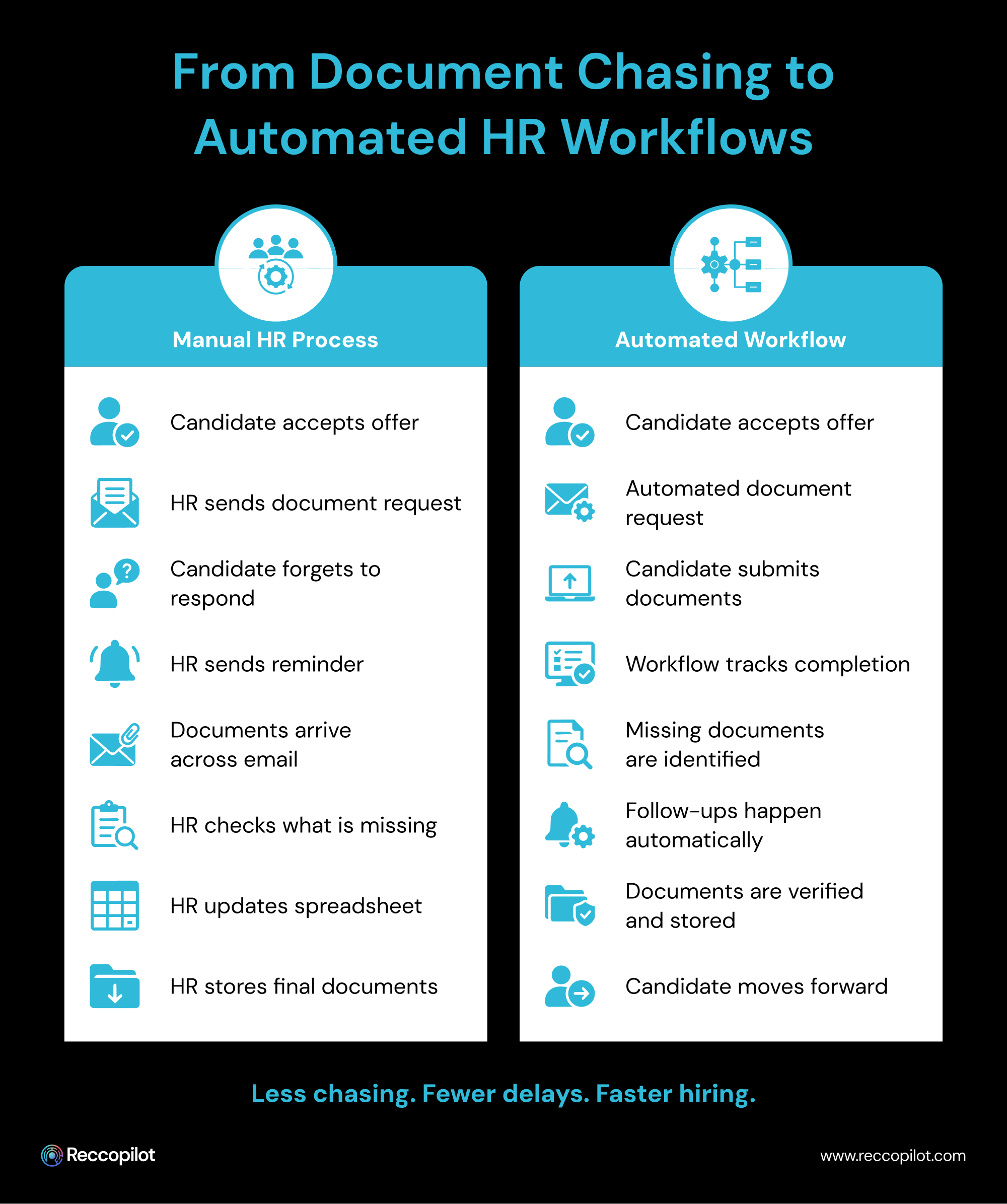
Document workflow automation involves using digital tools to streamline the process of requesting documents, collecting them, reviewing and signing, tracking progress, and storing them somewhere accessible. For HR and recruiting teams tasked with chasing down every document needed for a candidate or employee, that entails far more than just scanning them in a digital format.
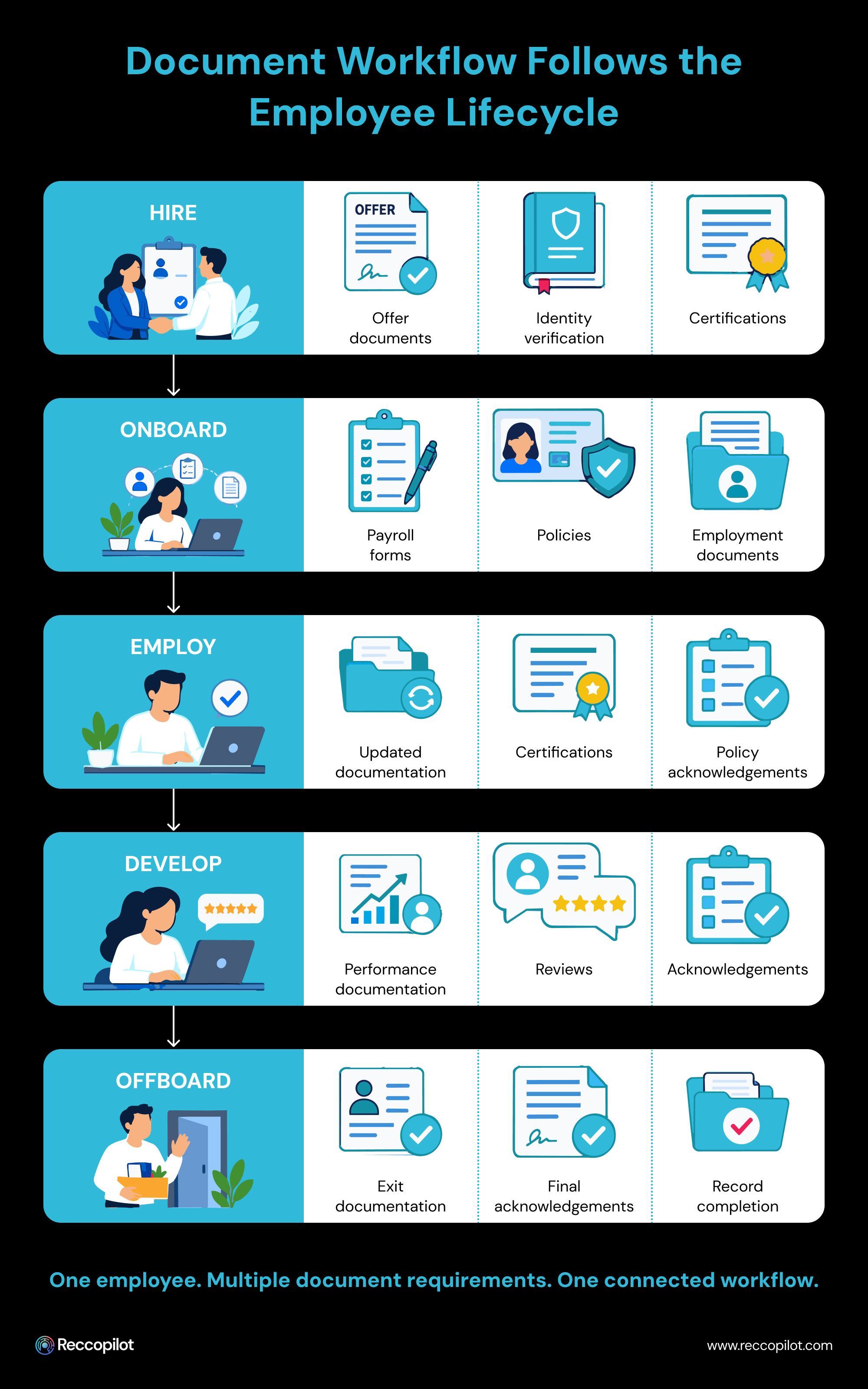
Every step in which a document plays a role has specific rules and requirements depending on the context and who needs to review or sign it. That can take different forms for different stages of a candidate's or employee's lifecycle:
While the requested item always comes first, the administrative work required to get it is far more than just asking for it and storing the completed version in a shared drive. It's about following up and ensuring everything is completed, especially when a specific deadline is on the horizon.
That's why automating document workflows is so valuable to the process - by eliminating some of those administrative tasks that don't need to be completed by people, the rest of the recruitment and retention process can become more efficient.
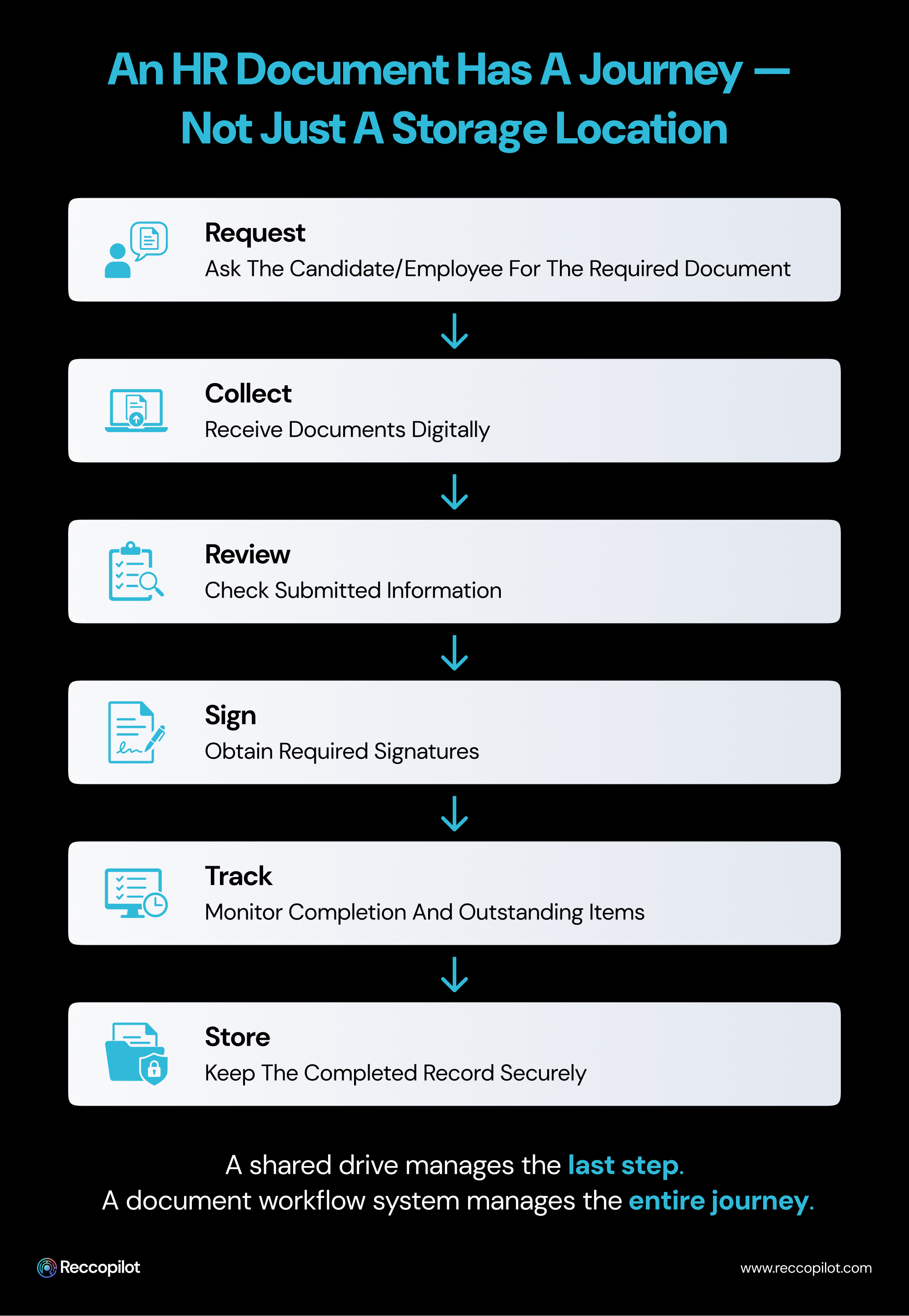
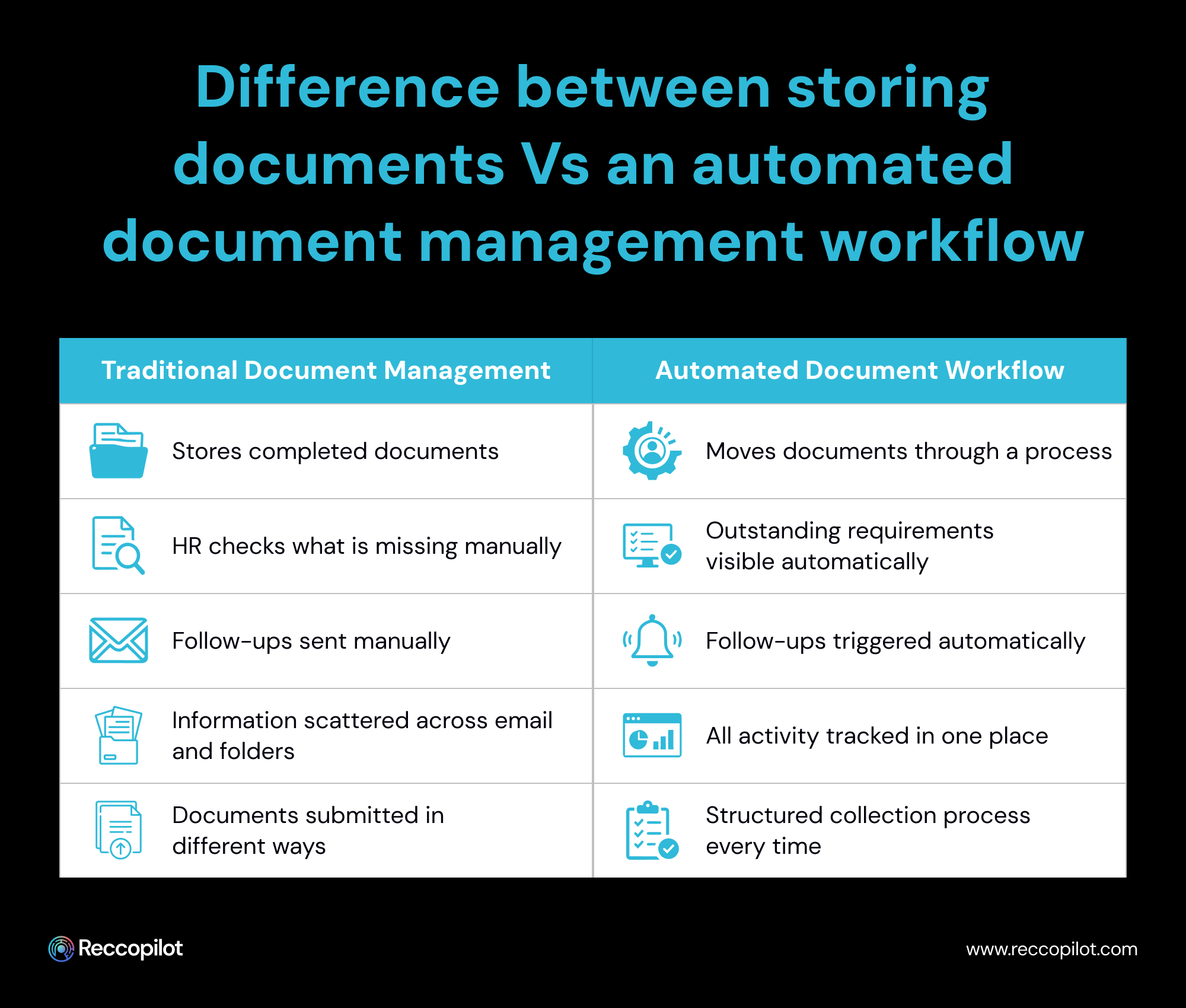
For HR teams, that can begin with understanding the difference between merely storing documents and having an automated workflow for them.
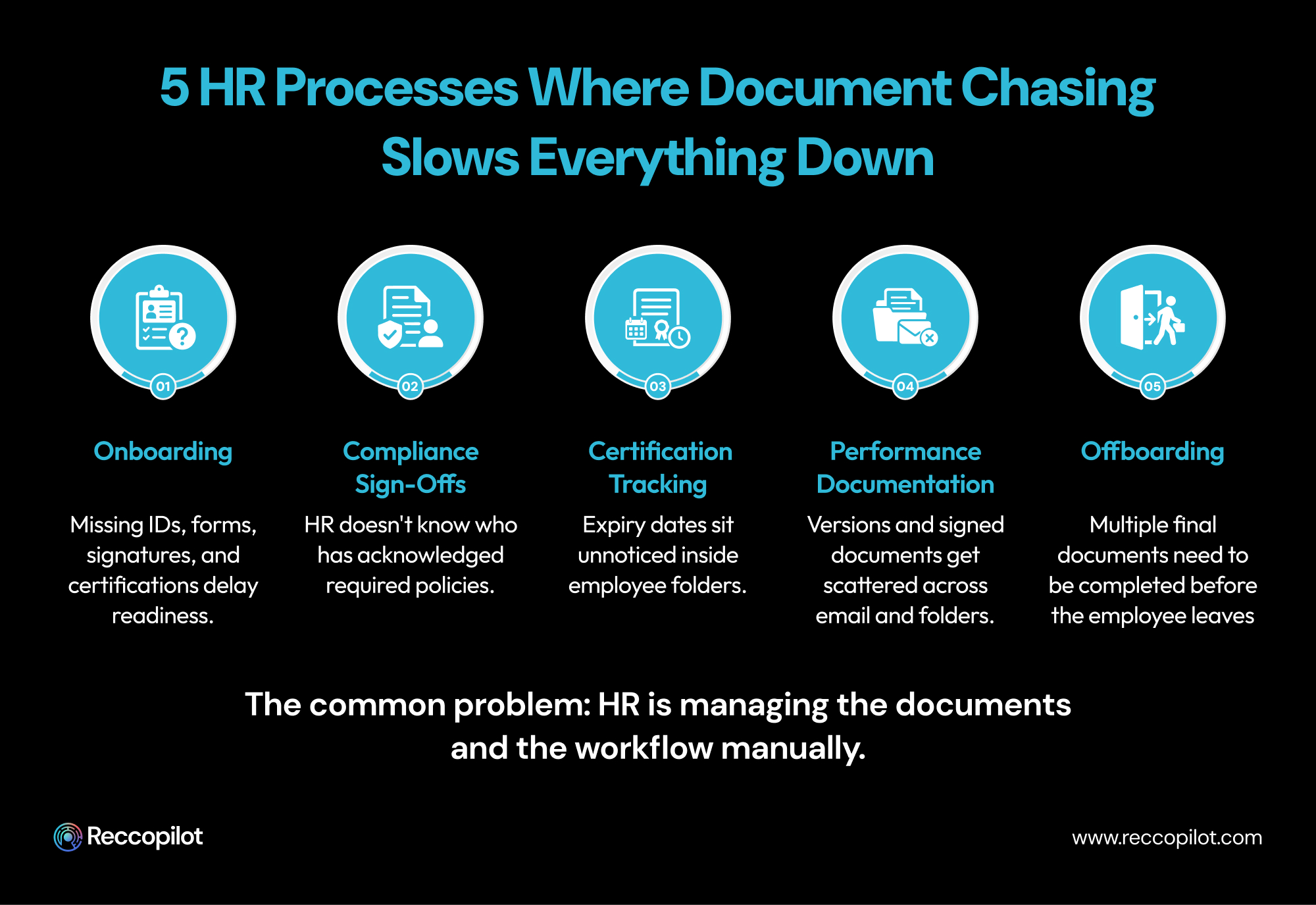
The issue with document management in HR is that the same problems tend to crop up across different stages of the employee lifecycle.
An offer has been accepted by a candidate, and an onboarding email has included a list of required documents. The candidate responds with a subset of them, while another was attached to an email two days later, and one was simply forgotten about.
By Friday, someone on the HR team has to manually check their file to identify what was still outstanding before sending the reminder.
This is the point at which onboarding workflows have to rely on people to keep track of who has submitted what, which is why the onboarding process is so reliant on the recruiter to serve as the reminder for every document they're still waiting for.
Meanwhile, the process for the candidate is to keep track of what they've sent versus what they still need to provide.
A more efficient onboarding process creates transparency, so that both parties know what still needs to happen. It removes the guesswork for everyone by putting the information directly in front of them and reducing the number of additional emails that need to be sent, which is especially important considering how high-volume onboarding typically is for organizations.
When it comes to compliance requirements, HR will often send a document to hundreds of employees and consider them done.
But when it comes to actually reviewing who has responded to the request for information, there is no system in place to know who has signed off on a policy, who hasn't, who is overdue, and who has seen a specific version of the document.
This is where spreadsheets and chasing people down via email are ineffective, and an automated document workflow can be critical to ensuring no one slips through the cracks, especially for those who are due by a specific deadline.
That same principle can apply to other HR processes that rely on people to send, receive, and store documents in separate locations.
In the same way that compliance sign-offs can fall victim to poor administration, certificate management can suffer from not having a system in place to identify which employees have the required documents on file.
For employees with different certifications that need to be renewed at different intervals, HR may have to ask themselves:
When a document has expired, those questions can get even more complicated. That's why automation can help turn certificate management from a task that gets put off until the last minute into a process that can be followed throughout the year.
Rather than simply asking for the documents and storing them away, HR can follow up on each certificate and ensure it's still valid.
When performance documentation can't be retrieved easily, it can cause issues further down the road. After a manager has drafted a document, the employee reads over the suggested changes before a revised version is sent to them via email. The signed version ultimately ends up in the hands of HR.
Six months later, someone needs to find that complete version again, but it has to be retrieved from the manager's inbox. That might not sound like much, but when multiplied by how many performance-related documents go through the system, it can quickly become too much to handle.
That's why having a uniform document management process makes it easier to identify where each version of a document is. It also helps reduce the number of managers who rely on their own personal process for performance documentation rather than standardizing a digital procedure.
Finally, the offboarding process is the one that makes people realize how many loose ends there are in their HR processes. There is only one date for departure, but there are dozens of tasks that need to be completed before the official start of the exit process.
Some documents need to be signed or acknowledged, and those tasks can fall to different people. All of that has to be handled in a much shorter timeframe than anything else in the employee lifecycle.
That makes offboarding the most vulnerable time for issues to arise, which is why a document workflow tailored to this stage can be crucial.
It can provide much-needed clarity for all the requirements that must be fulfilled by a specific date. Instead of having all those tasks waiting to be handled in someone's inbox at the last minute, a predefined set of steps makes it easier to follow through with every part of the offboarding process, minimizing the number of loose ends.
The best way to identify what document workflow automation can offer is to examine each stage of the employee lifecycle to look at how a document management system would change things.
The process for requesting documents begins as soon as someone has to provide them. Rather than having a unique set of emails for every new candidate, HR can use a unified document collection process. That way, every new hire gets the same streamlined procedure without having to recreate the same document collection steps every time someone accepts an offer.
Once the documents have been requested, it's important to ensure that they are received and processed.
By enabling visibility into what has been submitted, an AI document management system reduces the amount of time spent chasing after outstanding paperwork. If a candidate has sent five of the required six items, HR has a much better idea of what to do next.
That may seem simple, but it's part of what makes document workflow automation so valuable. By removing some of the guesswork that comes with waiting for someone to reply, the next steps in the process can be much quicker, especially when reminders can be automated. That reduces the number of times a recruiter has to act as the reminder system for a candidate's pending items.
Requesting and collecting documents isn't the end of the process, since there are often items that need to be sent or received while a person is already employed.
This is another area where automation is essential, particularly with larger organizations.
A procedure that works well for 20 employees who all know each other can get much more challenging when multiplied by hundreds of other employees with varying levels of internal familiarity.
Document workflow automation creates a repeatable procedure, reducing the likelihood of mistakes due to confusion.
This is especially true for certification management, as different employees will need to renew their qualifications at different points throughout the year. Even when someone successfully updates their certification documents, it can be easy to forget them until the next time they need to be renewed.
This is why an AI document management system should be able to provide regular progress updates as documents are submitted.
Performance documentation is similar to other document management procedures.
Once a document has been created, it needs to be sent to the employee for review, sent back for changes if necessary, and then signed or acknowledged to finalize the process.
The people involved in this procedure have to make the decisions about what to do with a document, but automation can reduce the amount of administrative tasks required.
Performance documentation procedures also tend to apply to offboarding, since certain processes need to be completed during the exit interview or by the end of the last working day. Those documents may need to be signed by the employee, and additional acknowledgments may need to be sent or received by other members of the team.
The best way to handle offboarding documents is to provide a systematic approach that everyone can follow, which is much easier than relying on people to respond to random emails.
A uniform set of steps makes it much simpler to identify any remaining tasks when it's close to an employee's exit date, limiting the number of loose ends. The same principles apply across every stage of the employee lifecycle, and it's important to identify how a document management system should support each one.
Not every document workflow automation tool is the same, and a solution that works well for one industry might not be compatible with the needs of another.
It can be tempting to use the same platform for every part of the administrative process, but that overlooks the fact that each area has its own requirements.
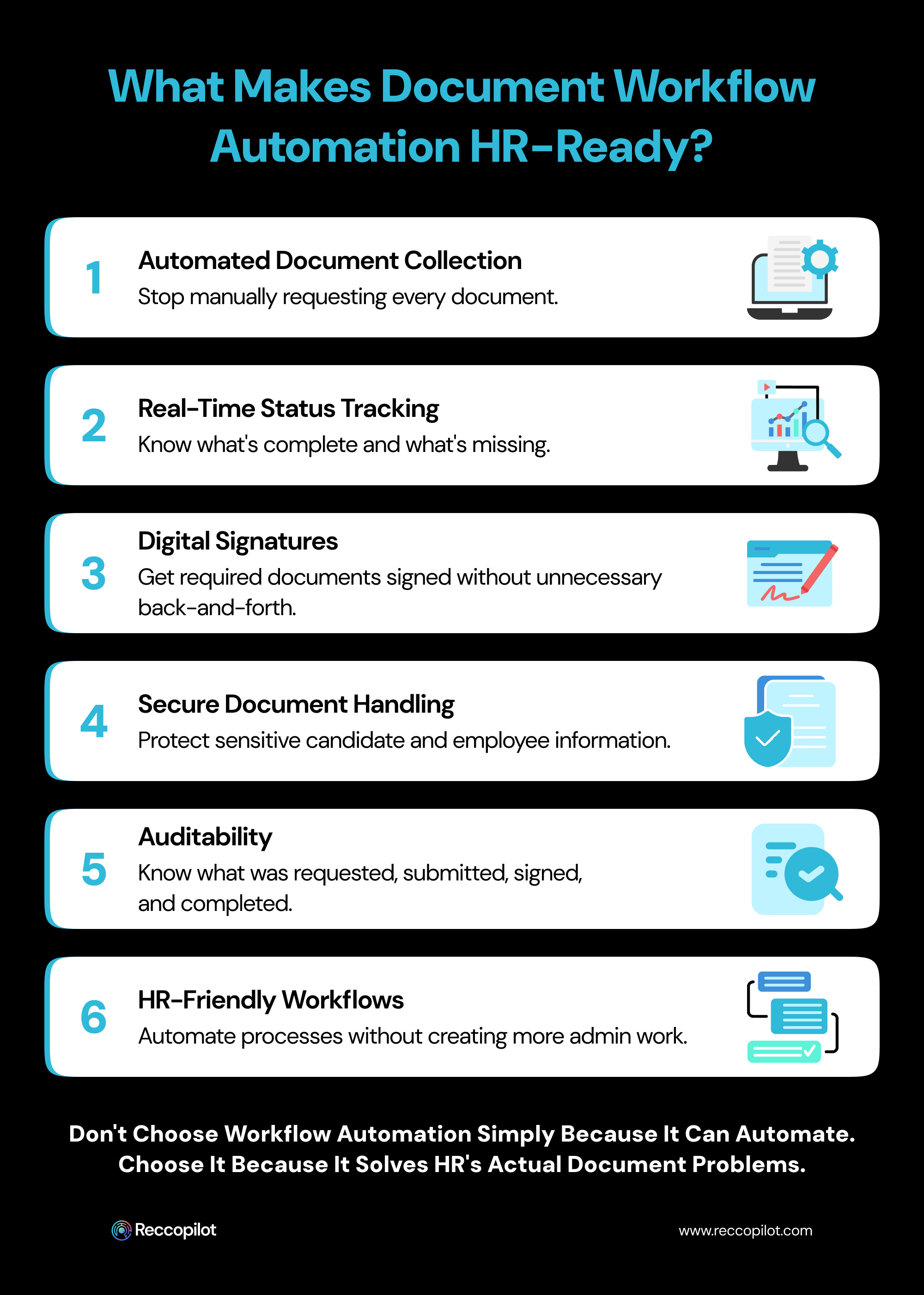
Document collection is likely to have different needs than invoice management, which is why it's important to identify what HR needs in an automated document workflow system.
That should be evident based on the needs of HR, since many of these tools are focused on collecting documents from applicants. If the main issue is requesting documents from candidates, the ideal solution should be able to automate that rather than simply providing another place to upload a file.
Along those lines, HR should be able to have a clear view of what documents are still pending.
That means anyone who has to ask "What are we still waiting for?" should be able to get a straightforward answer rather than searching through a series of emails looking for an answer.
As mentioned above, documents often need to be signed before they can be finalized. That should be a seamless process that doesn't require switching between different platforms for document management, email, and digital signing.
Candidate and employee documents can contain sensitive information, which is why security should be a priority for any AI document management system used by HR. Access controls and protections for these files can't be an afterthought for a document workflow automation solution intended for use by HR teams.
HR needs to be able to identify who has done what within the document management process. That goes beyond simply knowing where a finalized version of a document is located and extends to tracking submissions, signatures, and more. A good document management system should be able to support that level of auditing.
Finally, it's important to identify how usable the document workflow system is.
A lot of software is designed with end users in mind, but that doesn't always extend to the people responsible for setting up the procedure, particularly when it requires complex configurations to set up document collection. The right tool will reduce the amount of administrative burden for everyone who has to interact with it.
This is where Reccopilot makes things much easier. It enables teams to collect candidate documents as part of the automated hiring workflow, so recruiters spend less time chasing items and more time engaging with candidates.
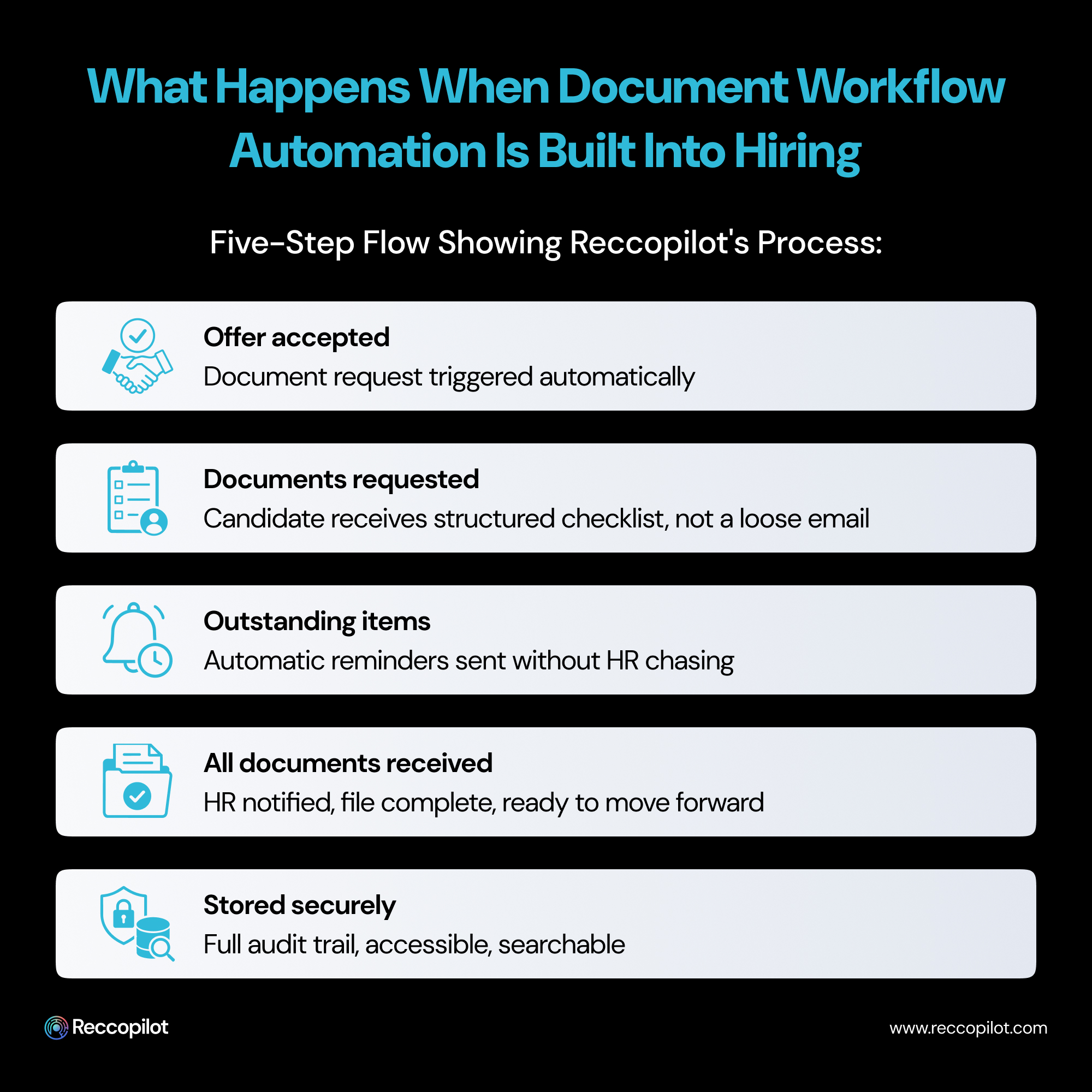
This document collection feature is built directly into the hiring process, requests and submissions don't have to be managed separately from making an offer. Reccopilot can automate the process from requesting documents to collecting and verifying them, supporting digital signature collection, and storing the final version securely while giving full visibility into what's been submitted.
If a candidate fails to complete a step, Reccopilot notifies them about what's needed. If they successfully provide the required information, HR can see it's been processed. When all documentation has been received, the team moves on instead of wasting time chasing paperwork. That's how you automate document workflow for HR. Not making recruiters do the same things repeatedly - eliminating the unnecessary tasks so they can focus on what actually requires human input.
Reccopilot offers a free trial so organizations can see how automated document collection fits into their hiring process before committing to a larger-scale change.
HR teams should never measure productivity by the number of reminder emails they send. But document collection has become so entrenched in the hiring and onboarding process that it's seen as inevitable.
It doesn't have to be. Beyond saving time, it smooths out the onboarding process when it's most crucial for a new employee to get settled. It reduces compliance issues when policies aren't acknowledged by deadline. It prevents recruiters from wasting time on tasks that could have been automated.
Most importantly, it helps HR dedicate effort to things that actually require a human touch. That's what Reccopilot helps organizations accomplish.




