


Top 10 HR Document Management Software Solutions
Read Time
10 Minutes
Updated On
October 28, 2026
.jpeg)



Every HR team has their own horror story about spending twenty minutes trying to find a contract signed eighteen months previously that somehow, according to one or more of the people asked, was definitely somewhere in shared drive or the person’s email or, possibly, the office filing cabinet, which, coincidentally, was relocated during the big office restructure a year ago. It happens again and again because too many teams have tried to solve their HR document management needs with methods ill-suited to the realities of the workplace, such as shared drives/email/institutional memory.
However, HR document management software offers a remedy by providing an alternative to a disjointed process involving email, shared drives, and, often, a complex series of paper-based administrative procedures. It is, therefore, a necessity for modern workplaces since it provides a centralized location for document storage, management, and retrieval while ensuring compliance with applicable regulations.
There is now an extensive market for such software, which can make choosing between the different options confusing. Below is a list of the top ten HR document management software platforms, as well as an analysis of their particular strengths and weaknesses.
.jpg)
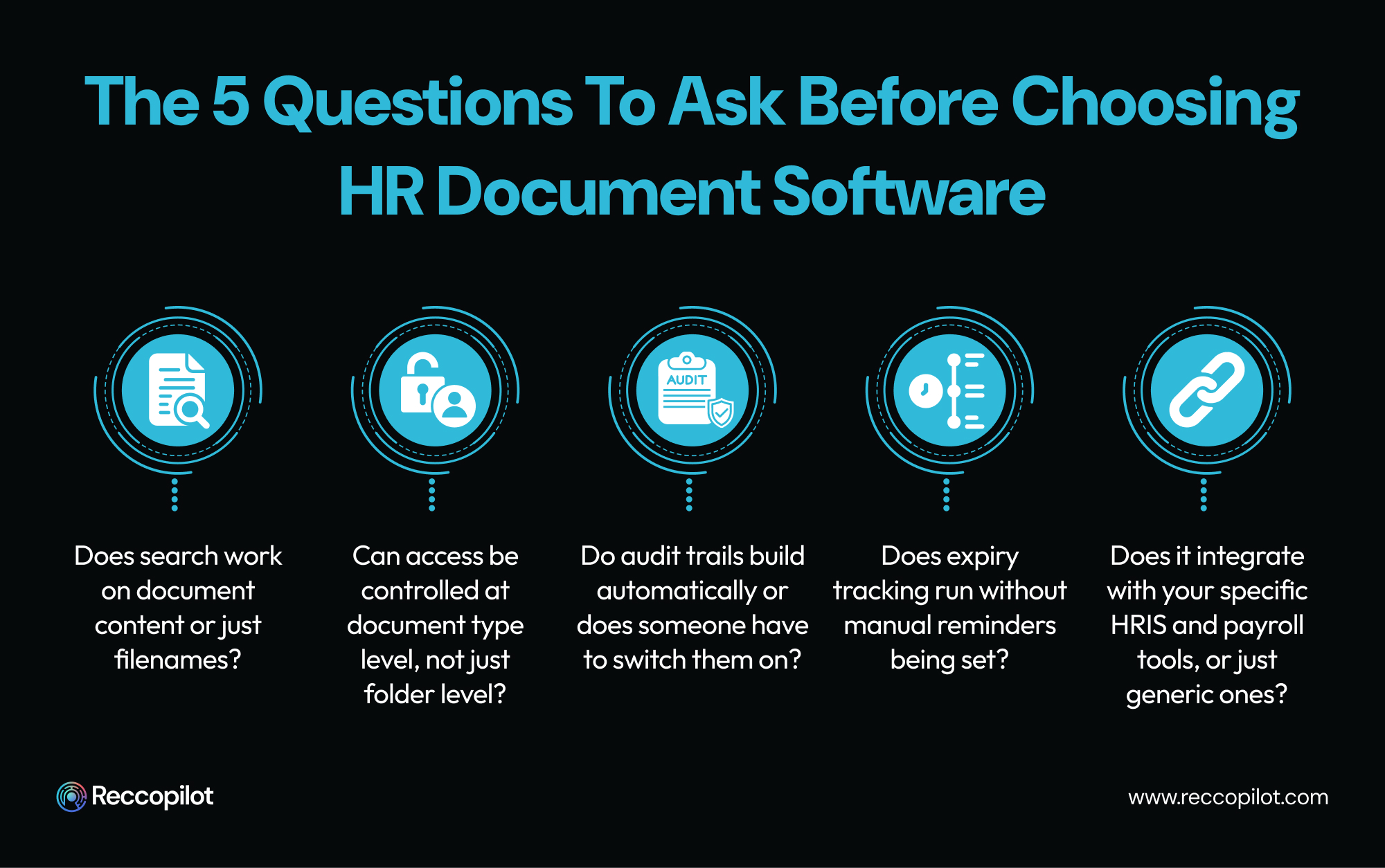
When considering the different software options, it is essential to highlight certain features, functionalities, and aspects that are particularly vital to day-to-day operations. Ideally, the search function should go beyond simple filename searches and allow scanning and searching of the document’s content itself.
It is also advisable to ensure that the software allows for role-specific access restrictions and that audit trails are built into the system. Additionally, automatic expiry warnings should be a must, as well as integration with the organization’s relevant HRIS systems and payroll platforms.
Most document management platforms store what you give them. Reccopilot manages the entire employee document lifecycle - from offer letter through every stage of employment to final offboarding paperwork, with automation built into every step. Documents get classified automatically on arrival without anyone manually sorting them. Search works on document content, not filenames, which means finding anything takes seconds rather than the twenty-minute hunt that prompted this list in the first place.
Onboarding is where a lot of teams first notice the difference. Select a start date and the system triggers the right documents in the right order, sends them to the right people, chases outstanding signatures automatically, and files everything once complete. HR doesn't have to track what's been sent, what's been signed, and what's still outstanding - the system surfaces anything that needs attention without anyone building a tracker to monitor it.
Compliance tracking runs the same way. Certifications, contracts, visa documentation - expiry dates get flagged ahead of time automatically. Audit trails build in the background on every document interaction without anyone switching a setting on. Role-based access controls keep sensitive files exactly where they should be at the document type level, not just the folder level.
The free trial lets HR teams run their actual documents through the system - real files, real workflows, real search needs - rather than a sanitized demo. That kind of test tells you more in twenty minutes than any feature comparison will.
Key Features:
Pros:
Cons:
Best For: Organizations seeking a comprehensive solution that automates as much as possible while still being easy to use. Reccopilot’s free trial option means that users get to see exactly how the software will benefit their organization without any commitment.
This platform offers a robust set of employee document management features as part of its broader HR software suite. It provides an end-to-end solution that covers every aspect of employee recordkeeping while managing to stay intuitive and user-friendly at the same time. In other words, BambooHR can handle all of an organization’s document management needs, but it is best suited for organizations that prefer a more integrated approach to their HR management.
Key Features:
Pros:
Cons:
Best For: Organizations that want to manage their document management needs within a broader framework of an integrated suite of HR tools.
Unlike many other platforms on this list, Rippling is more focused on providing a unified view of an organization’s recruiter, HR, IT, and finance management needs, with document management being just one part of the overall solution. It offers broad automation while also offering extensive customization options so that organizations can design their document management procedures according to their specific needs.
Key Features:
Pros:
Cons:
Best For: Larger organizations that want to manage all aspects of their management needs from one platform.
GoCo is another platform that is more focused on providing a streamlined onboarding experience that takes much of the hassle out of the process by automating as many steps as possible without compromising flexibility and customization. The document management features are best used for managing onboarding-related documents, which are processed intuitively and automatically by the system.
Key Features:
Pros:
Cons:
Best For: Organizations that want a hassle-free onboarding experience that is intuitive for all users while still being highly customizable.
Clinked represents an alternative approach to document management by emphasizing collaboration features and providing access to documents via a branded portal. The platform is intuitive and relatively straightforward to implement, making it ideal for organizations that need to give external stakeholders access to certain documents.
Key Features:
Pros:
Cons:
Best For: Organizations that need to provide external document access to clients or contractors and need to collaborate closely with these stakeholders.
Compared to the other options on this list, DynaFile is designed specifically for managing employee records and is particularly suited for organizations looking to make the transition from paper-based to digital records. It offers extensive compliance management options, including detailed document audit trails and retention schedules.
Key Features:
Pros:
Cons:
Best For: Organizations that want a comprehensive solution for managing employee records, including transitioning from paper-based to digital records.
Paylocity's document management is embedded within its broader HR and payroll platform, making it an attractive option if your team is already using Paylocity for other processes. It's ideal if you want document management to be tied directly to your payroll data but do not want to deal with a separate document management system.
Key Features:
Pros:
Cons:
Best for: Paylocity customers wanting document management features deeply tied to their existing payroll data without adopting a separate document management platform
DocuWare is an enterprise document management system positioned as a solution for complex enterprise document management needs. The software is capable of handling higher volumes of documents with more complex retention and content management needs compared to mid-tier or entry-level solutions. DocuWare has particularly strong configuration options for organizations that need to build out specialized automation around their document management workflows.
Key Features:
Pros:
Cons:
Best for: Enterprises with high-volume document management needs and additional compliance or automation requirements around their document management processes
PandaDoc is a document creation and e-signature platform that has expanded its capabilities to include HR-related document use cases, such as offer letters, contracts, and policy acknowledgment forms. Overall, PandaDoc provides the best e-signature and document creation experience on the list, with extensive features around document tracking, engagement, and analytics.
Key Features:
Pros:
Cons:
Best for: Teams with primary document management needs centered around document creation and e-signature rather than the management of employee files
Dropbox Business is a cloud storage platform that serves as an option for HR teams looking to store their files in the cloud. The software is much less feature-rich and provides fewer document management features than the rest of the solutions on this list, but some teams prefer Dropbox Business due to its ease of use and ability to collaborate with external stakeholders.
Key Features:
Pros:
Cons:
Best for: Very small HR teams with minimal document storage and sharing needs
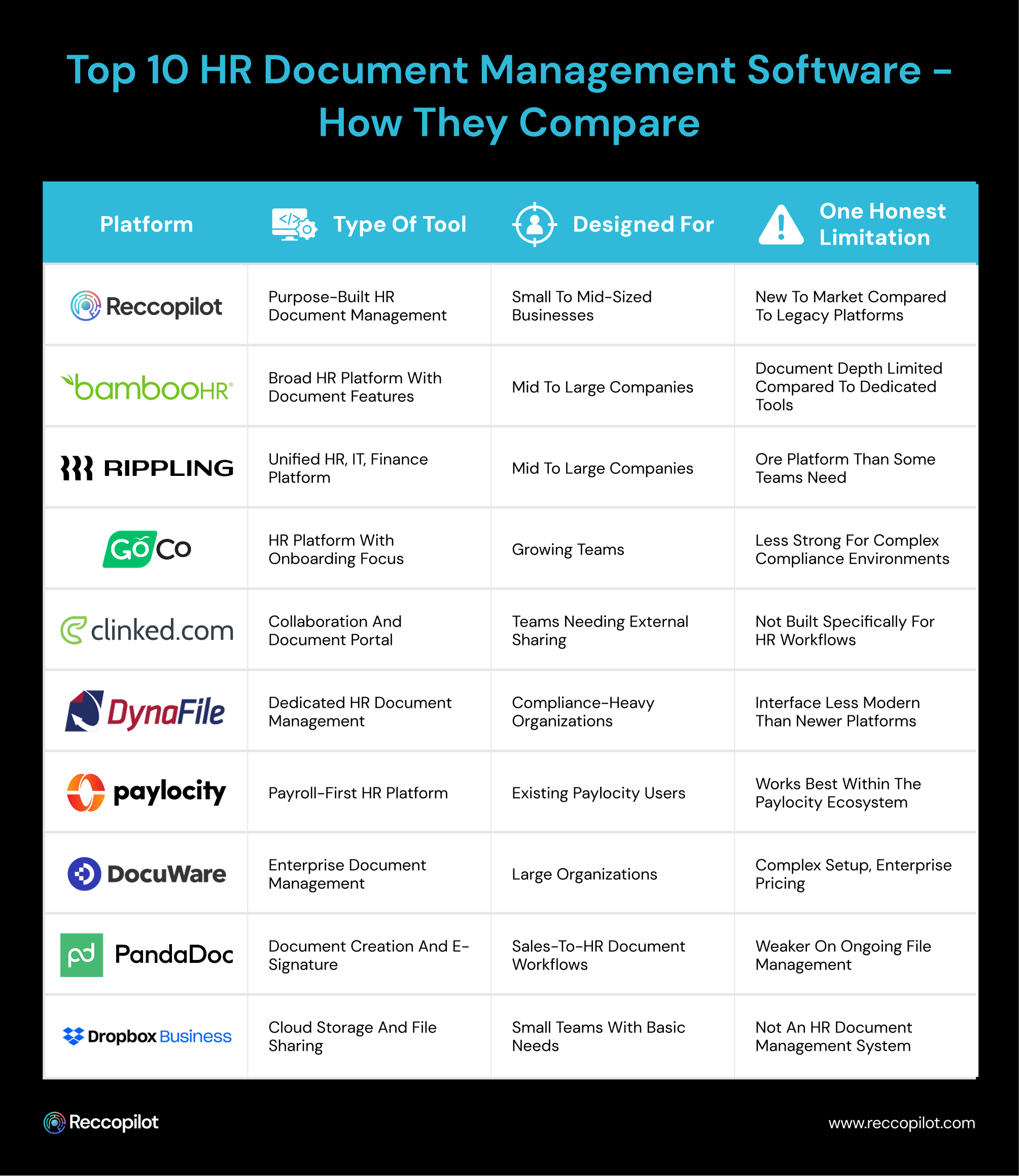
HR document management systems are typically selected based on the specific needs that a team has. There isn't a solution that is objectively better than the rest in all use cases, which is why it's important to carefully evaluate what a team actually needs and what they can realistically implement.
Several considerations typically have a major impact on the choice of an HR document management system, namely:
While this last point might seem like common sense, it is frequently overlooked by teams that get recommended a particular software based on weak requirements. As mentioned, most of these solutions are much more geared towards providing out-of-the-box document management features rather than being extremely configurable and offering broad automation options. In other words, platforms usually only demonstrate their strengths during a demo.
Therefore it is important to request a demo and ask specific questions about how a certain software would address the needs of the team to get a realistic assessment of how suitable a given software would be in a specific case.
.jpg)
HR document management software is one of the most utilitarian but least flashy categories of software. It forms the basis for other, more outward-facing HR operations, such as onboarding, compliance, performance management, and offboarding, but does not generate engagement on its own.
Shared drives used to be the standard in HR document management, but as organizations grow both in size and complexity, the limitations of shared drives become limiting in terms of organization, permissions, audit trails, and automation.
Most organizations should look to upgrade their document management solutions beyond shared drives at some point in their growth. It rarely makes sense to stick to shared drives beyond early stages, although there are some use cases where they might still make sense, such as in very small teams.
However, as soon as teams have any level of multi-location or remote setup alongside file management needs, shared drives are no longer viable.




